Asking doctors before we build
User interviews and concept testing for the MIMS disease and medical news website. Three medical professionals, five parts of the site, and a set of recommendations that all shipped.

- Timeline
- 2025
- Scope
- User research, concept testing
Overview
Put the options in front of the people who read the site.
After a revamp of the MIMS disease and medical news website, we had a short list of things we weren’t sure about. Rather than pick concepts in a meeting room, I put two or three options for each one in front of the people the site is for.
I spoke to a medical writer, a CME lead and a physician, one at a time, over one week in July 2025. I wrote a report after each session and combined them into one set of recommendations. The team approved them, and all of them shipped later that year.
Why we asked
The revamp left a few open questions.
The new site had a better structure, but some parts of it could be argued either way from inside the team:
On the news list, choosing a specialty made it jump to the front of the filter. Helpful or confusing? On mobile, the main menu sat behind a burger icon. Did people still find the other sections? Disease pages showed contents and next-page links at both the top and the bottom. Was that clear? Was search easy to find, and should it be on every page? And did readers notice related articles and diseases at all?
I wanted to hear from people who read medical content for a living before we changed anything.
How I planned it
Five topics, a few concepts each, and one question: why?
I planned and ran the round on my own, from choosing the topics to writing up the results.
For every topic I designed two or three concepts that solved the same problem in different ways. Where it made sense, one of them was the live design, so we had something real to compare against. Some concepts were deliberately low-fidelity and grey. I wanted people to react to the structure, not the colours.
In each session I showed the concepts side by side and asked which one they would use, and why. The why mattered most. A preference without a reason is hard to design from. A reason like “it looks like an ad” tells you exactly what to fix.
- 01
Pick the topics
Five parts of the site the revamp left us unsure about.
- 02
Design the concepts
Two or three per topic, some low-fidelity on purpose.
- 03
Talk to three people
A medical writer, a CME lead and a physician, 23 to 30 July 2025.
- 04
Write it up each time
Background, feedback per concept, their pick and their words.
- 05
Recommend
One summary with a recommendation per topic, two weeks later.
Specialty filter
Making a filter look like a filter.
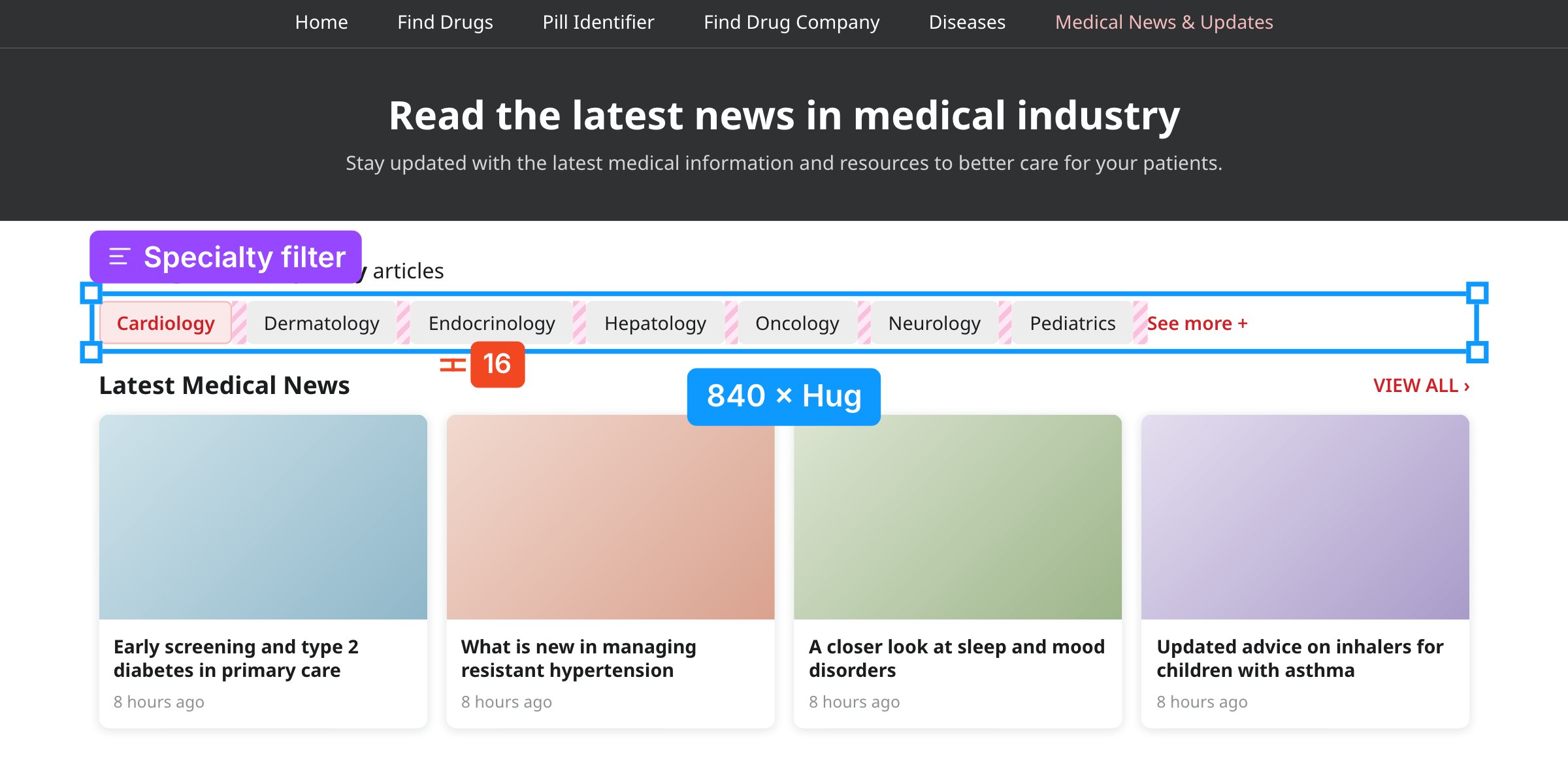
On the news list, readers narrow articles down by specialty. I tested a dropdown, a row of visible specialties, and a combined version that shows every specialty in one place.
All three preferred a filter they could see. The medical writer didn’t recognise the dropdown as a filter at all.
“It doesn’t intuitively look like a filter, whereas like usually websites have that filter symbol.”
Medical writer
Concept A
Dropdown
Tidy, but the specialties were hidden until you opened it, and it didn’t look like a filter.

Concept B · the base we kept
Visible specialties
The main specialties sit in a row you can scan, one click each. All three found it easy to use.
Concept C
Combined
Every specialty in one place, with the current choice ticked. The CME lead found it easiest to understand; the physician found the list long. We borrowed its steady layout.
Blue outline: the part each concept tests. Redrawn from my prototypes, with placeholder content.
The CME lead noticed something we had been unsure about. On the live site, a specialty jumped to the front of the row once you picked it, and for a moment she lost her place.
“If the component moves, then it sort of... for a fraction of seconds, you tend to get a little confused.”
CME lead
Why it works: a visible filter means people recognise their options instead of having to remember them (heuristic 6). An item that stays put keeps the row predictable and makes the current choice clear (heuristics 1 and 4).
Search
Search belongs next to what it searches.
I tested three places for search on the disease page: in the top bar, inside a large banner, and in the content area.
Two of the three participants felt the top-bar search blended into the frame of the site, sitting next to the dark navigation and the ad space. The banner was hard to miss, but the CME lead said it “looks like an ad banner.” What worked was search inside the content, close to what it searches, with a label that says what it is for.
“It is right in front… there’s nothing above or below to confuse.”
CME lead
Concept A
In the top bar
Next to the dark navigation and the ad space, two of the three read it as part of the site’s frame rather than a tool.
Concept B
In a banner
Impossible to miss, but the CME lead said it “looks like an ad banner,” and the label didn’t say what it searched.
Concept C · shipped
In the content
Under the page title, labelled for what it searches, and away from ads. We then added search to every page.
Why it works: a search field next to ads and navigation loses its contrast, so it drops down the visual hierarchy (heuristic 8). A label like “Search diseases” uses the reader’s words and tells them what they will get (heuristic 2).
Mobile navigation
Speed or structure? They wanted both.
Disease pages are long. On a phone, should the contents be a floating button you can open from anywhere, or a full list at the top? This was the one topic with no clear winner, and I think that made it the most useful.
The medical writer liked the floating button for one-handed reading, found the full list faster for finding things, and suggested a mix of both. The CME lead preferred the full list but worried it looked long. The physician liked how fast the floating version was but found its dropdown confusing, and wanted to see what was in a section before jumping to it.
Read side by side, they weren’t really disagreeing. Each one valued a different thing: speed, an overview, and knowing what is in a section before you open it.
“Being able to scroll everything in the whole page with one hand is great.”
Medical writer
The header
I also tested the mobile header with the physician: the main sections shown at the top, or tucked into a burger menu. With the condensed version she asked where the tabs had gone. She wanted to see them “so I can change and compare.” We kept the main sections visible.
Why it works: hidden contents and hidden sections both ask people to remember what is there (heuristic 6). Visible sections give a quick way to move between them and back (heuristic 3).
Related content
Seen, not skipped.
On an article page, where should related articles and diseases go, and do they need images? Everyone agreed on the first part: related content at the very bottom gets missed.
“Putting everything on the bottom just minimizes chances of people visiting the related articles.”
Medical writer
Images split the group. Two participants said images made related items stand out and easier to tell apart from ads. The physician didn’t need them and raised something the others didn’t: “More image… more delay.” It was a trade-off worth taking seriously.
Concept A
Bottom only
Everyone agreed related content at the very end gets missed. You only reach it if you finish the article.
Concept B
Side, text links
Visible while you read and quick to load. The physician preferred it; the medical writer felt text alone didn’t stand out.
Concept C · shipped
Side, images optional
Related articles beside the article and related diseases at the end, as the medical writer suggested. A small image helps them stand apart from ads, but the layout works without one, so pages stay quick.
Why it works: content below the fold sits at the bottom of the visual hierarchy, so moving it beside the article lifts it. Images are used only where they help, which keeps the page light (heuristic 8).
What I learned
People are good at telling you why something feels wrong.
They can’t always tell you the fix, but the reason is usually enough to design from. A few things I’m taking into every project since.
Ask why, not which
“Which do you prefer?” gave me a vote. “Why?” gave me something to design with. Hearing that a search bar “looks like an ad banner,” or that a moving filter made someone lose their place for a moment, was more useful than any pick, because it told me exactly what to change.
Mixed feedback is a brief, not a tie
On mobile navigation all three people wanted different things. Once I wrote down the reason behind each choice, they weren’t really disagreeing: speed, an overview, and a preview before jumping. The version that shipped tries to give all three.
Context changes how a design reads
The same search field was invisible in the top bar, looked like an advert in a banner, and worked in the content area. Nothing about the field changed, only what sat around it. I now review components where they will actually live, not on their own.
Users settle arguments the team can’t
We had gone back and forth about the specialty that jumped to the front of the filter. One sentence from the CME lead settled it. A short round of interviews cost far less than another meeting.
Small rounds are worth it, if you’re honest about them
Three people won’t give you statistics, so I looked for agreement and reasons rather than counting votes. One participant works within the wider MIMS group, and I tested the mobile header with one person only. Next time I’d recruit more widely, give each concept a fixed name from the start (“Design 2” drifted between sessions), add a short task like “find the treatment section”, and check back after launch to see whether the changes did what people told us they would.
Let’s talk
I’d love to tell you more on a call.
There’s more to this project than fits on one page. If you’re interested, I’m happy to walk you through the sessions, the trade-offs and what I’d do next.