Helping healthcare professionals come back to their learning
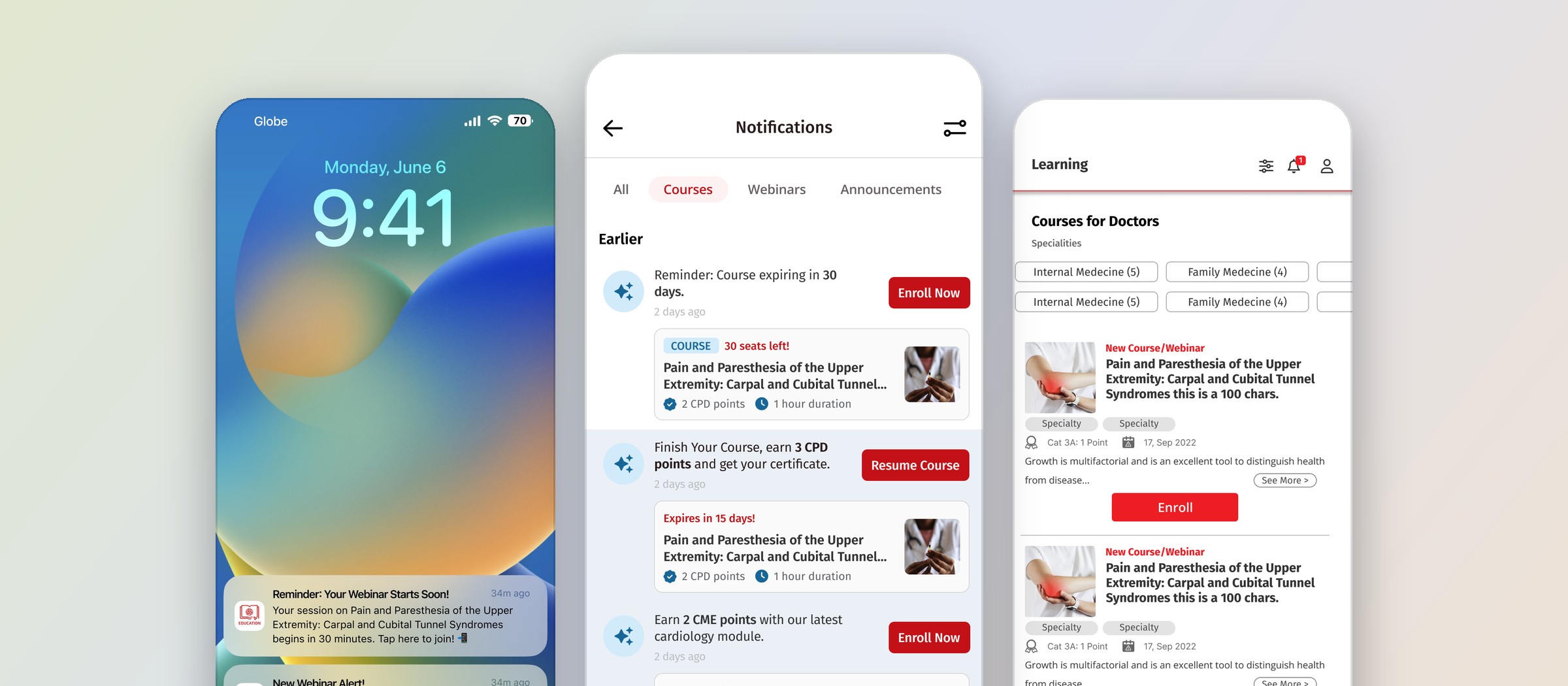
I worked on the notification experience for the MIMS Education app. The aim was simple: remind people about the webinars and courses they had already shown interest in, and make the next step easy to take.
- Timeline
- 2025
- Scope
- Product design, product strategy
Overview
What helps someone come back after they sign up?
The app had plenty of good learning content, but signing up for something did not always mean coming back to it. I put together a proposal for how notifications could help: push notifications outside the app, a notification center inside it, and clear paths between the two.
After the system was introduced, we saw a clear increase in engagement. It was a team effort, and I was glad to see the idea hold up once it was in people’s hands.
The challenge
Signing up is only the first step.
Registering for a webinar or enrolling in a course is just the start. People sign up weeks before an event, leave a quiz half done, or lose track of a course deadline. Busy clinicians have a lot on their minds, so this is easy to understand.
My job was to help them notice these moments at the right time and know what to do next, without adding more noise to their day.
Four moments
I started from the moments, not the messages.
Before drawing any screens, I listed the moments where a nudge could actually be useful. They fell into four types. Pick one to see how it shows up as a push notification and inside the app.
Type A · Webinar reminders
Remember an upcoming webinar
People often register weeks ahead. A reminder close to the start time brings the webinar back to mind, and tapping it goes straight to joining.
Monday, June 6
9:41

Reminder: Your Webinar Starts Soon!34m ago
Your session on Pain and Paresthesia of the Upper Extremity: Carpal and Cubital Tunnel Syndromes begins in 30 minutes. Tap here to join!
New Webinar Alert!34m ago
We’ve added new webinars this month. Check them out now!
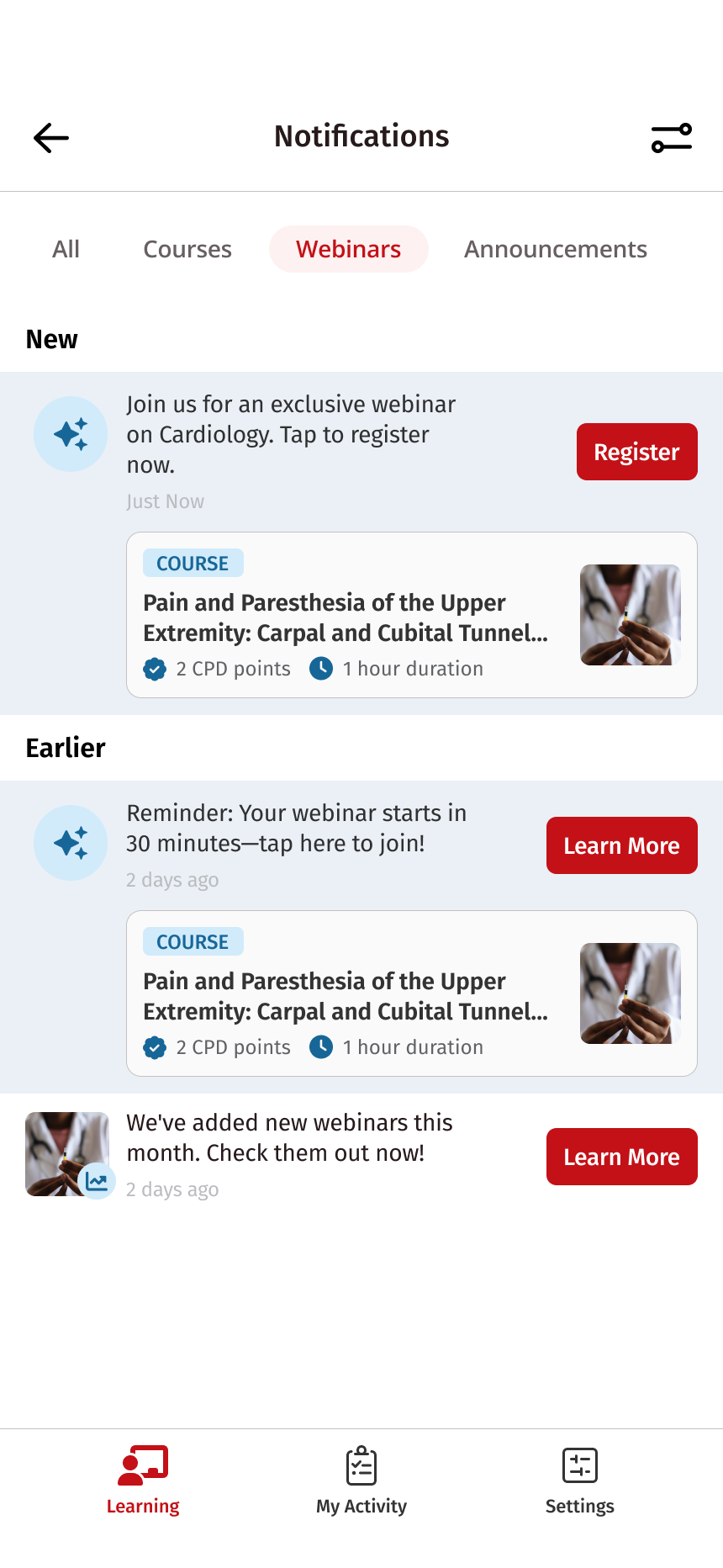
Join us for an exclusive webinar on Cardiology. Tap to register now.
2 days ago
Reminder: Your webinar starts in 30 minutes. Tap here to join!
2 days ago
We’ve added new webinars this month. Check them out now!
2 days agoType B · Incomplete actions
Continue unfinished learning
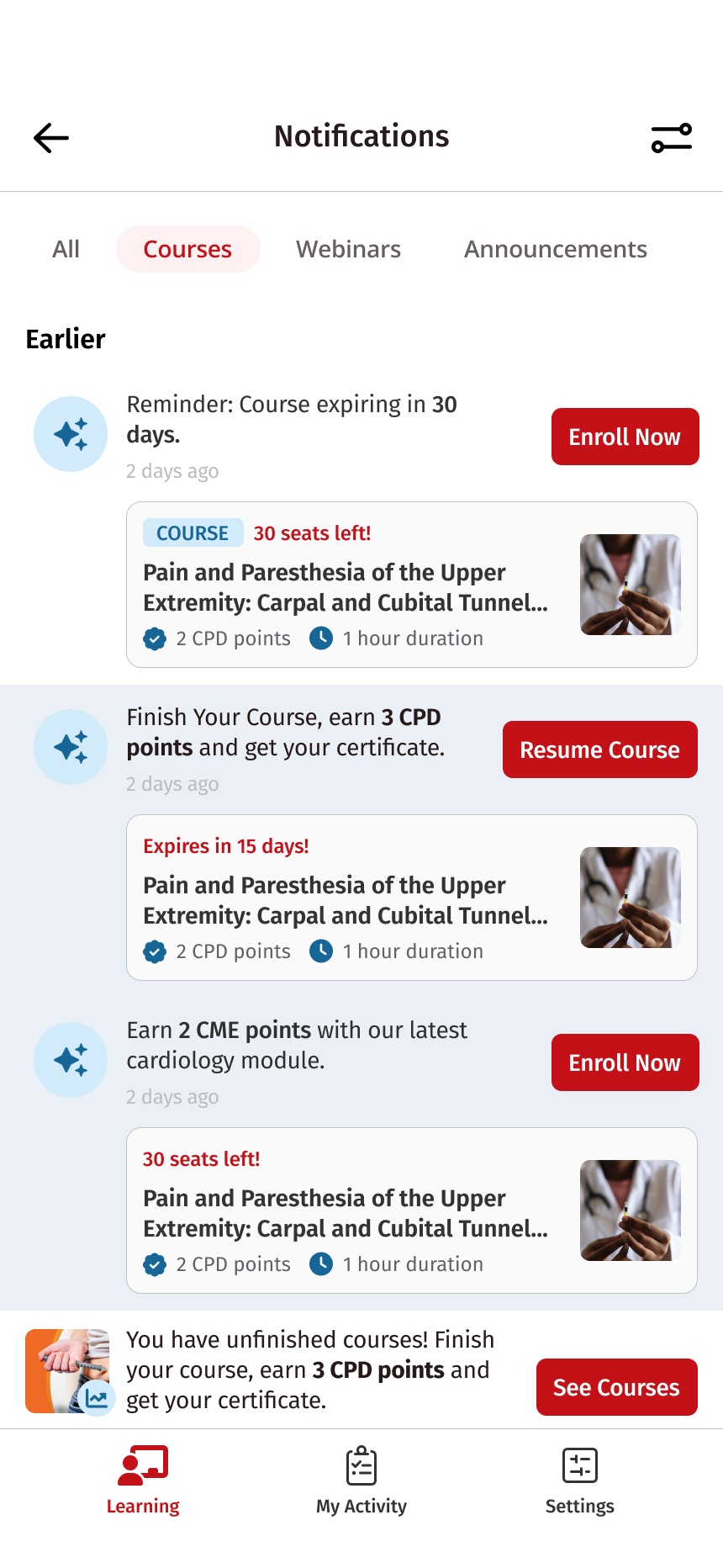
For quizzes left halfway and courses close to expiring. Each one carries a single clear action, like Resume Course or Enroll Now, so there is less to work out. I also pointed people to guidance on accessing quizzes and downloading CME/CPD certificates.
Monday, June 6
9:41
Reminder: Course Expiring Soon!34m ago
Your course Pain and Paresthesia of the Upper Extremity: Carpal and Cubital Tunnel Syndromes will expire in 30 days!
Reminder: Course expiring in 30 days.
2 days agoFinish Your Course, earn 3 CPD points and get your certificate.
2 days agoType C · New content and recommendations
Discover relevant content
Alerts for new webinars and courses, with suggestions based on specialty and location. I also explored ideas around past enrollments and what is popular within a specialty. These were proposals for the team to weigh, not final rules.
Monday, June 6
9:41
Popular in Internal Medicine!34m ago
Discover where other healthcare professionals are enrolling.
New Course Alert!34m ago
Earn 2 CME points with our latest cardiology module.
Keep Your Streak Alive!34m ago
You recently completed Hypertension Management Basics. Explore related courses and earn 2 CME points!

Popular in Internal Medicine! Discover where other healthcare professionals are enrolling.
2 days agoEarn 2 CME points with our latest cardiology module.
2 days ago
You recently completed Hypertension Management Basics. Explore related courses and earn 2 CME points!
2 days agoType D · Announcements
Stay informed about the app
Feature updates and promotions get a category of their own, so they don’t crowd out reminders about someone’s own learning.
Monday, June 6
9:41
Introducing a New Feature!34m ago
Make your learning even more fun and effective!
Exclusive Access for Physicians!34m ago
Consider Lisinopril for patients with high blood pressure. Proven efficacy in lowering BP and reducing cardiovascular risk. Learn more today!
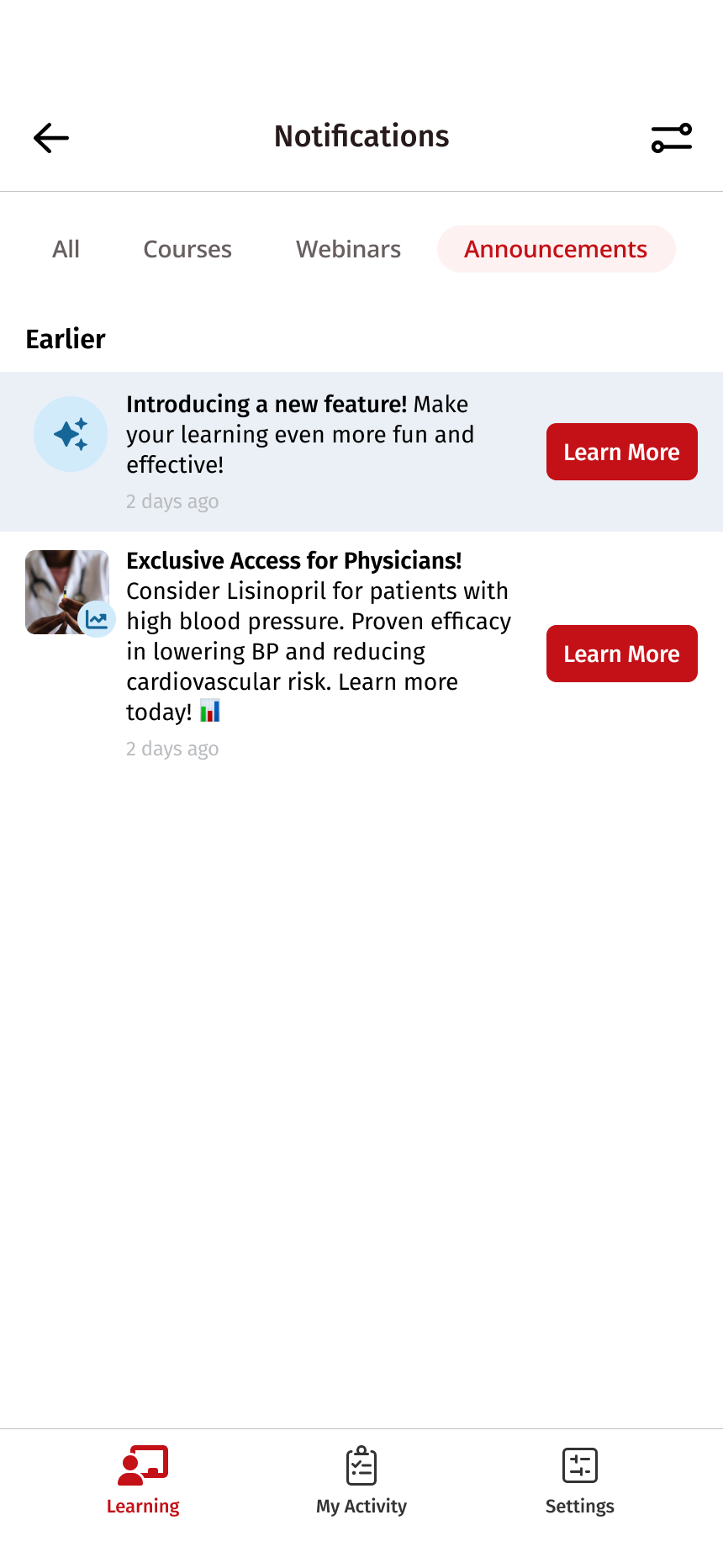
Introducing a new feature! Make your learning even more fun and effective!
2 days ago
Exclusive Access for Physicians! Consider Lisinopril for patients with high blood pressure. Proven efficacy in lowering BP and reducing cardiovascular risk. Learn more today!
2 days agoEntry points
Three ways back in, one place to land.
People can come back from outside the app or from inside it. Whichever way they come in, they end up in the same notification center, so a push they swiped away is not a reminder lost for good.
-
Outside the app
Popular in Internal Medicine!34m ago
Discover where other healthcare professionals are enrolling.
1Push notification
The most direct nudge. Short, specific, and opens the right screen when tapped.
-
Outside the app
1
2App icon badge
A quiet signal on the home screen that stays after a push is missed.
-
Inside the app
Learning13Bell in the Learning tab
For people already in the app, a badge on the bell shows there is something new.
Where they all lead
The notification center
One list, grouped into Courses, Webinars and Announcements, where every update stays until it is acted on.
Scanning
Trying to make it easy to scan.
In the notification center I used category tabs, short messages, and one visible action per item, like “Register”, “Resume Course” or “See Courses”.
The hope was that people could tell at a glance whether something was about a course they had already started or an invitation to try something new.
Destinations
Thinking about where each tap lands.
A notification is only as helpful as the screen it opens. I mapped each action to a destination, so a tap takes people to their next step instead of dropping them on the home screen.
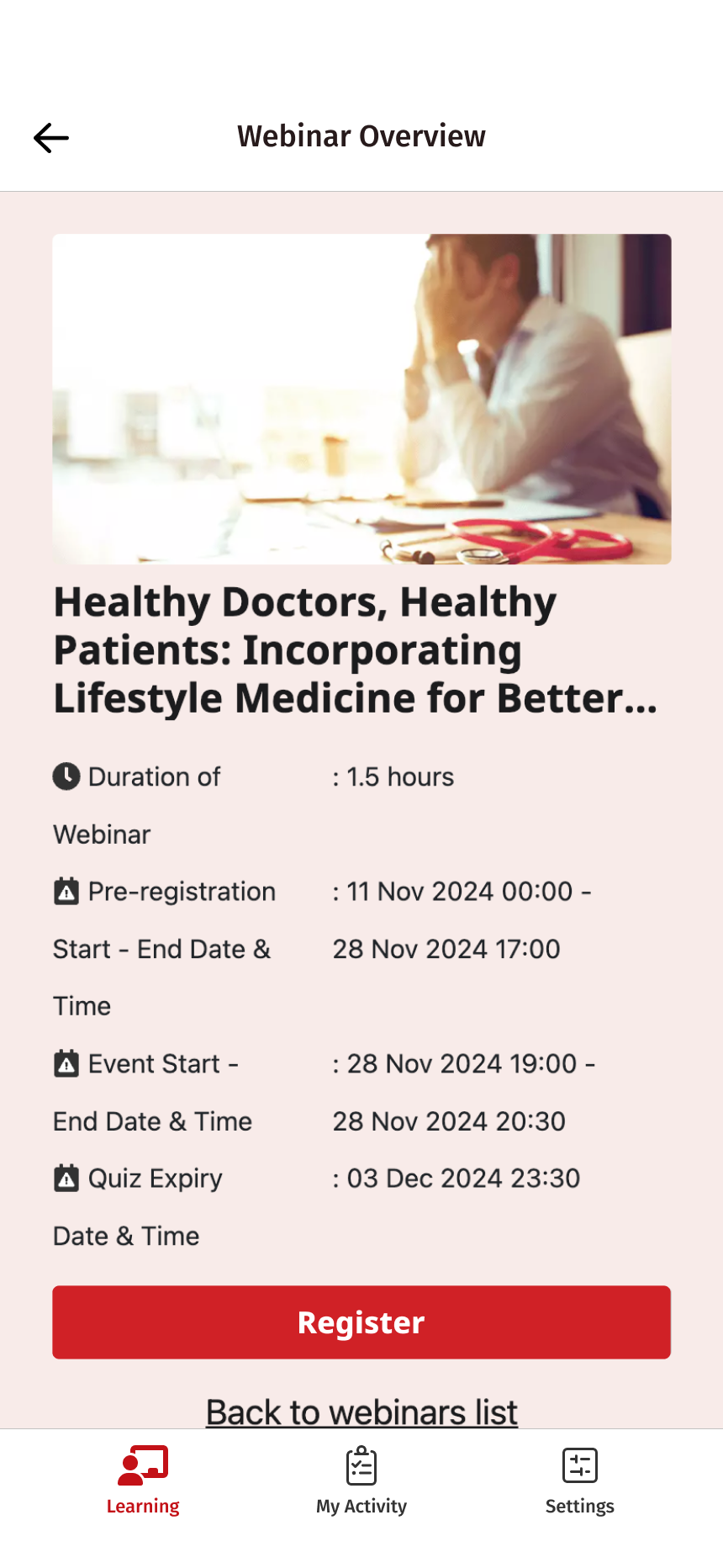
- RegisterWebinar overview
Duration and dates, with registration one tap away.
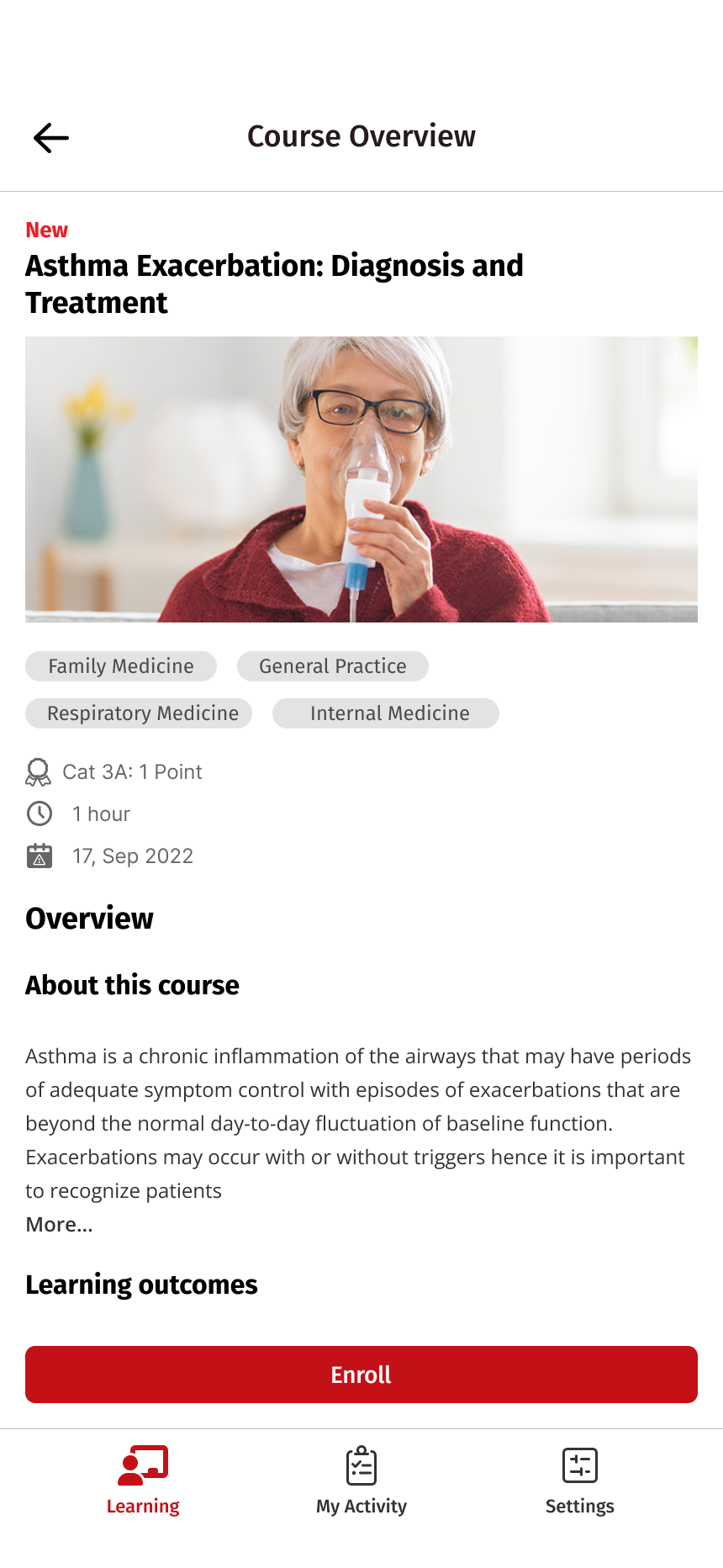
- Enroll NowCourse overview
Specialty, CPD points and what the course covers, ready to enroll.
- Resume CourseMy Activity
Courses in progress, each with a Resume button.
- See CoursesFiltered list
Popular courses, narrowed to the specialty the notification mentions.
- Learn MoreNotification detail
The full announcement, for updates that need more than one line.
Sharing it
Bringing the team in early.
I presented the concept to the team in three parts: the idea itself, a prototype demo, and an open conversation about next steps.
I closed with two questions, because the team knew things I didn’t. Does this fit your vision and priorities for the MIMS mobile app? And what should we focus on first as we move forward?
Outcome
What I took away.
After the notification system was introduced, we saw a clear increase in engagement. I’m happy it helped, and a lot of people had a hand in getting it there.
The biggest lesson for me was that a notification is a small part of a longer journey. It needs the right moment, a clear reason to come back, and a sensible place to land. If I picked this up again, I’d want to keep learning from how people respond and adjust the timing and wording from there.
Let’s talk
I’d love to tell you more on a call.
There’s more to this project than fits on one page. If you’re interested, I’m happy to walk you through the decisions, the trade-offs and what I’d do next.