easyPOS, a register and back office for shops and restaurants
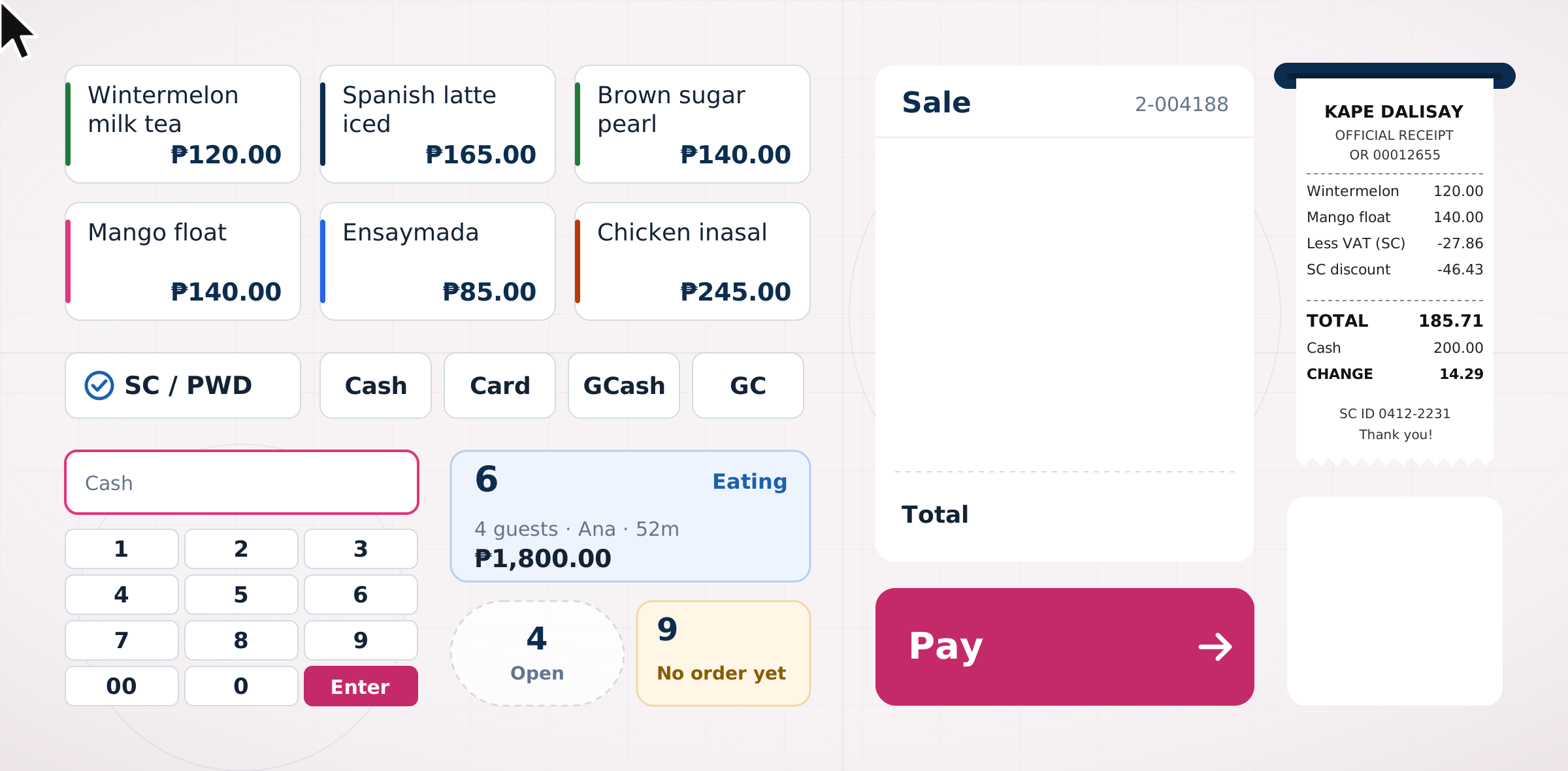
easyPOS is a point-of-sale system for shops and restaurants in the Philippines, from a single grocery to a chain of cafes. It is the third app in the Easy series, after easyFS and easyHR, designed on the same system in pink and shipped in 2024. This page walks through it: who it is for, how they use it, and the main screens.
- Timeline
- 2024
- Scope
- Product design, UI/UX design
Overview
Fast at the counter, right at the end of the day.
easyPOS has two parts. The register runs on a touch screen at the counter, in barcode mode for groceries and pharmacies or in touch mode for cafes and restaurants. Cashiers open a shift, ring up sales, take payments, handle refunds and close the shift. The back office runs in a browser, where supervisors check shifts and readings, and owners see sales, items and stock across branches.
I built it on the easyFS and easyHR system: the same shell, components and patterns, with pink as the brand colour, so the three apps read as one family. The register is a different place to design for. A cashier has a line in front of them, so the total and the next action are always the biggest things on screen and every target is at least 48 px. Anything that takes money out of the drawer asks for a reason, and voids and refunds use an orange-red, never the brand pink. The stores, people and amounts shown here are made up.
User journeys
Two counters and a closing.
A typical task for each kind of user, step by step. The line follows how each step feels, where it dips and where it recovers. The feelings are my assumptions and still need testing at a real counter.
-
Joy, cashier at a grocery
Rings up about 140 sales a shift with a scanner and a touch screen, with a line always in front of her. Wants to move the line fast and end the shift balanced.
- 01
Scans the basket
Scans 6 items. Each scan shows an Added line with Undo, and the total stays above Pay.
In flow - 02
Gives the senior discount
Lolita shows her OSCA ID. The sheet lists which items qualify and how much comes off.
Unsure then clear - 03
Takes two payments
₱300.00 by GCash, then ₱600.00 cash with a quick key. Change due shows at once.
Confident - 04
Refunds a leaking bottle
Finds the receipt, ticks the bottle, picks Damaged. Her supervisor enters a PIN.
Nervous then covered - 05
Closes and remits
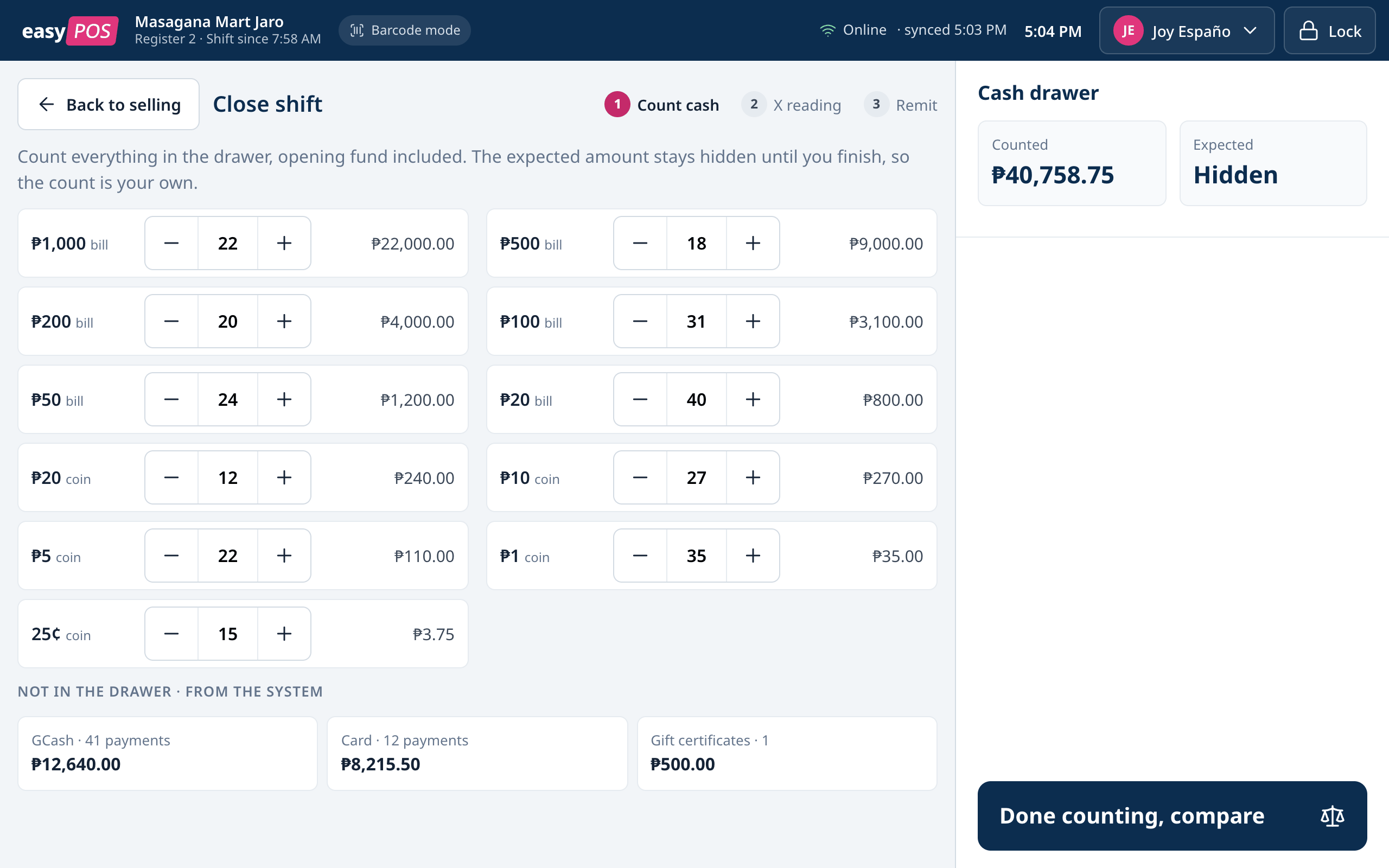
Counts the drawer before she sees the expected amount. ₱20.00 short, so she adds a note.
Tense then done
- 01
-
Paolo, cashier at a cafe
Runs the register for 18 tables at lunch, with two waiters calling orders. Wants orders right the first time and tables turned quickly.
- 01
Seats table 6
Taps the table on the floor plan and adds meals and drinks from the menu grid.
Busy - 02
Sends to the kitchen
Picks sugar, ice and pearls for the milk tea, then sends 7 items.
In control - 03
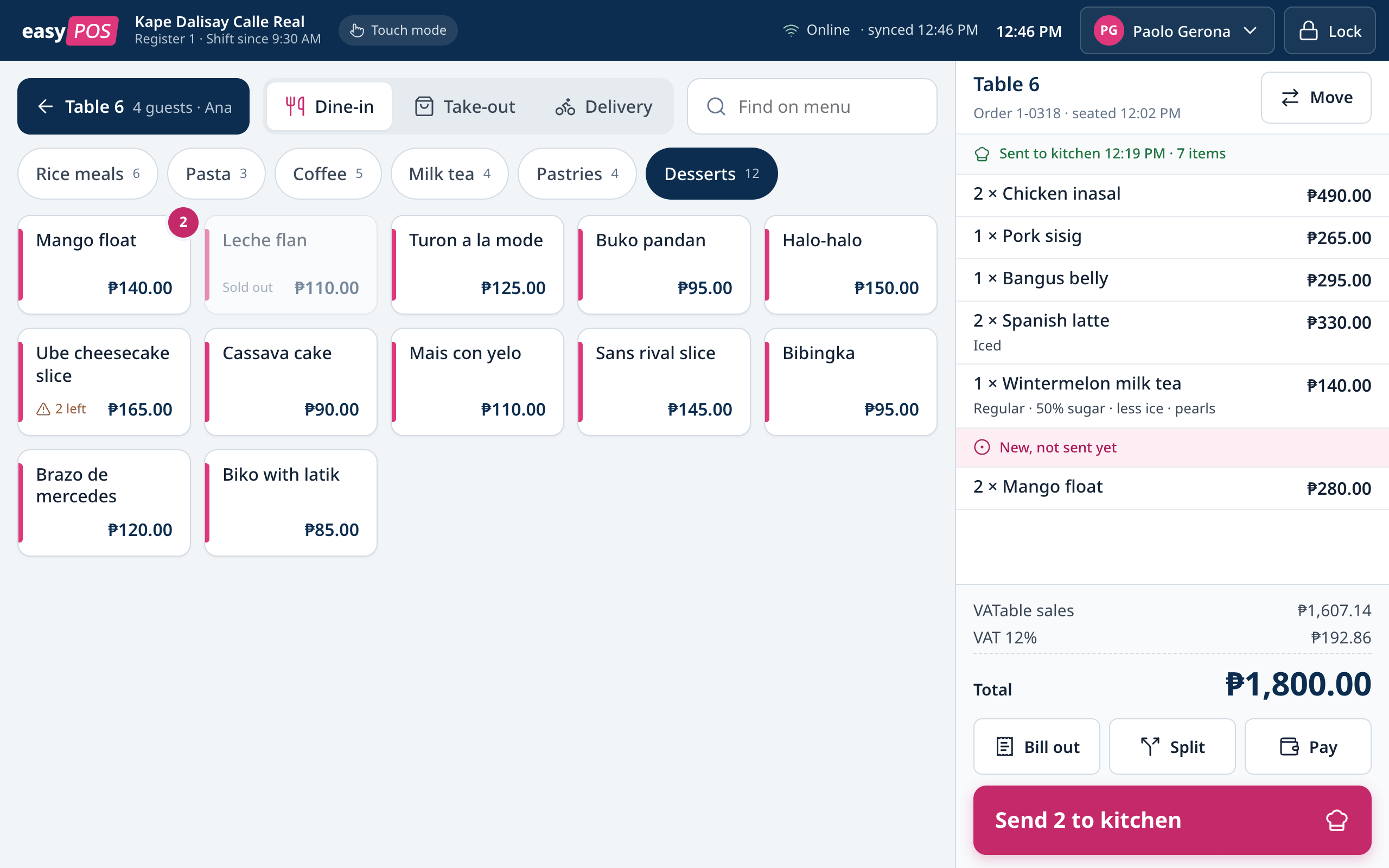
Adds dessert
The order shows what was already sent and what is new. Send only sends the new lines.
Unsure then clear - 04
Bills out
Prints the bill. Table 6 changes to Bill out on the map for everyone on the floor.
Calm - 05
Splits four ways
Splits ₱1,800.00 into four checks and takes each payment.
Relieved
- 01
-
Rhea, store supervisor
Approves voids and refunds, receives every remittance and closes the day. Wants to trust the day’s numbers.
- 01
Checks every shift
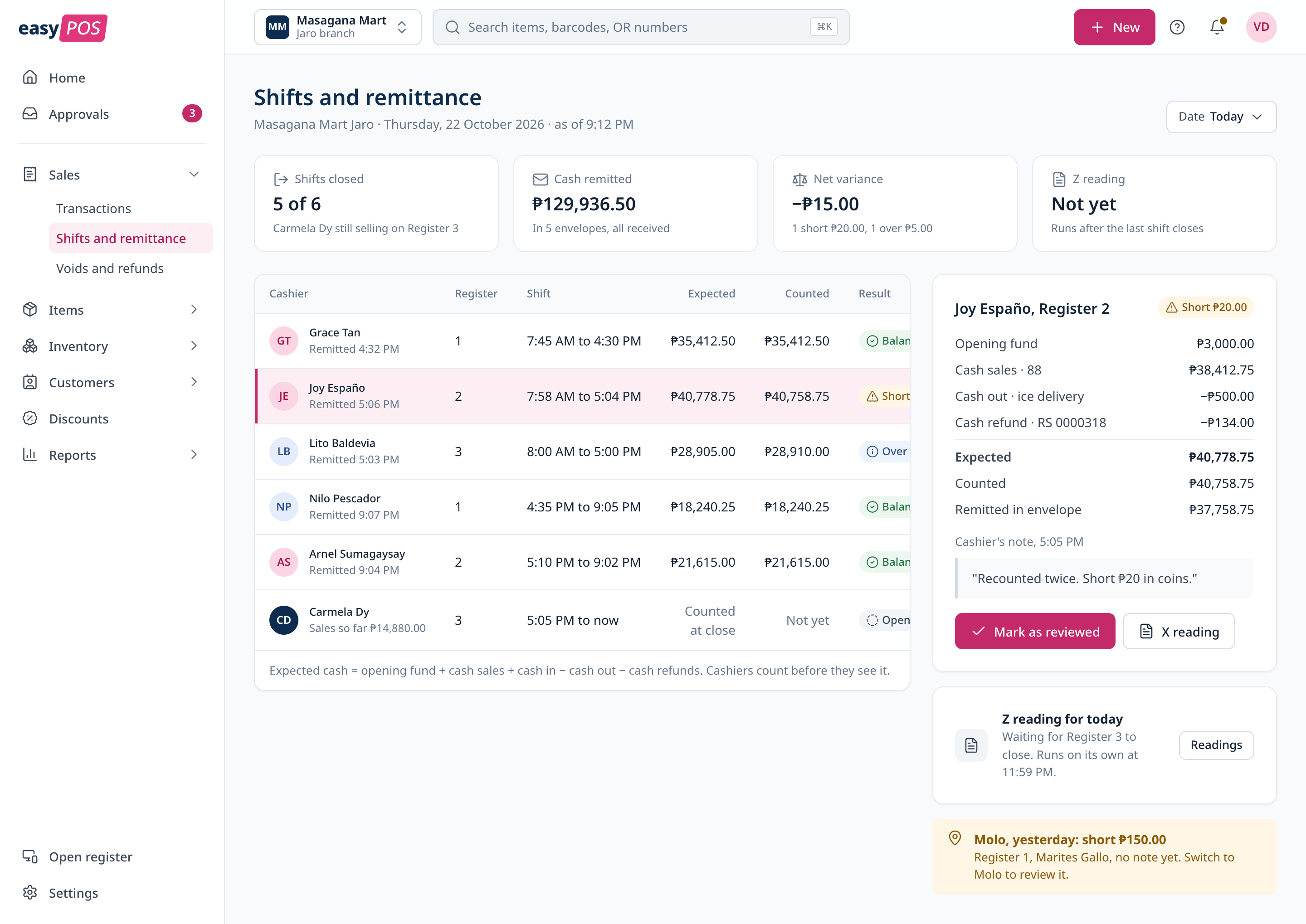
5 of 6 shifts are closed. Net variance for the day is −₱15.00.
Tired - 02
Reviews the short
Opens Joy’s shift, sees how expected was worked out and reads Joy’s note.
Fair - 03
Checks the Z readings
A notice says one register in another branch never closed yesterday, and how to fix it.
Worried then sure - 04
Restocks for tomorrow
Cooking oil is low. The afternoon delivery is posted against the purchase order.
Ready
- 01
Register
Scan first, total always in view.
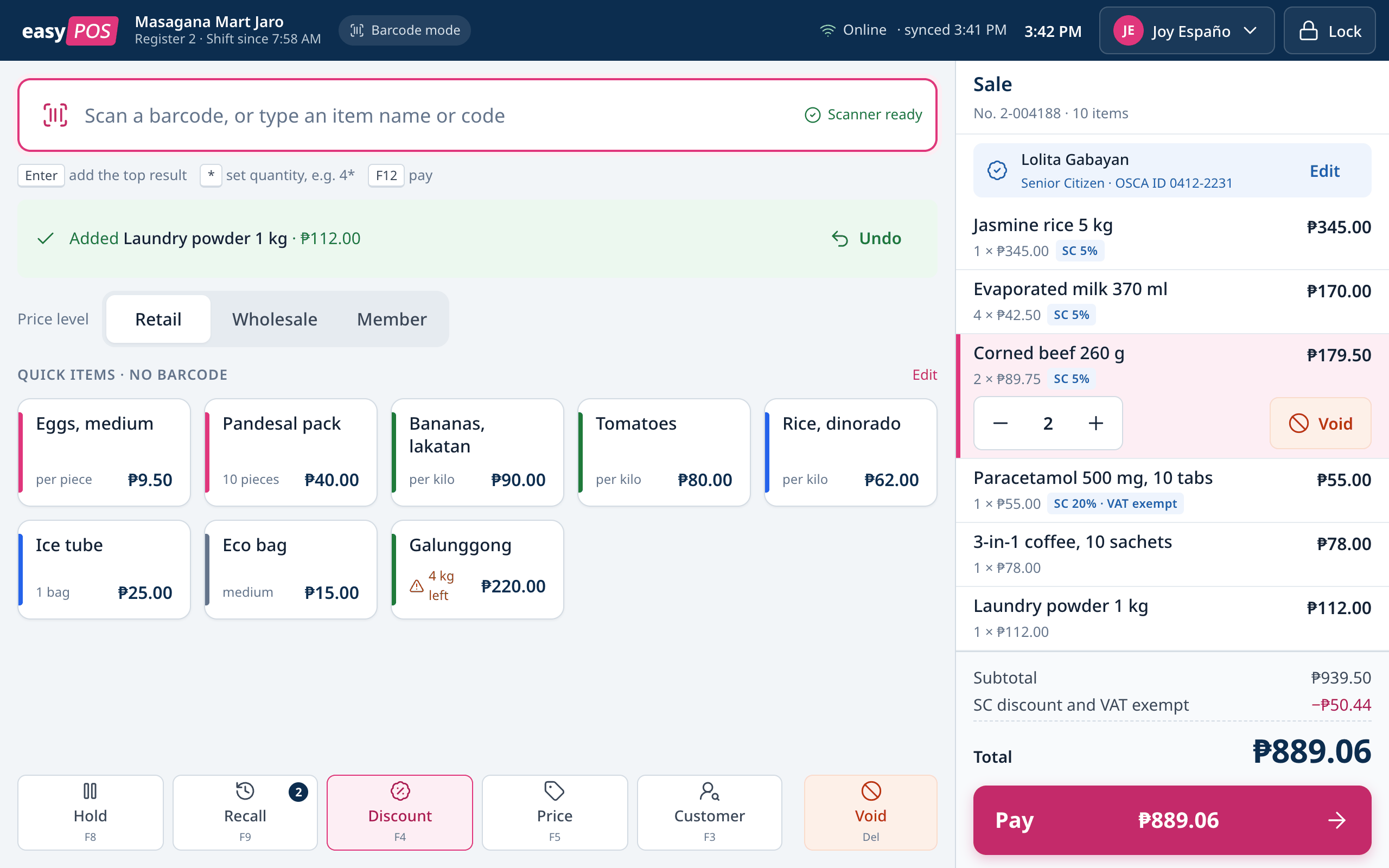
In barcode mode the scan field sits on top and every scan confirms with an Added line and Undo. The cart and the total stay on the right with Pay pinned at the bottom. Hold, Recall, Discount, Price, Customer and Void sit in a bar under the items, so Void is far from Pay.
Payment
Pay in parts, see what is left.
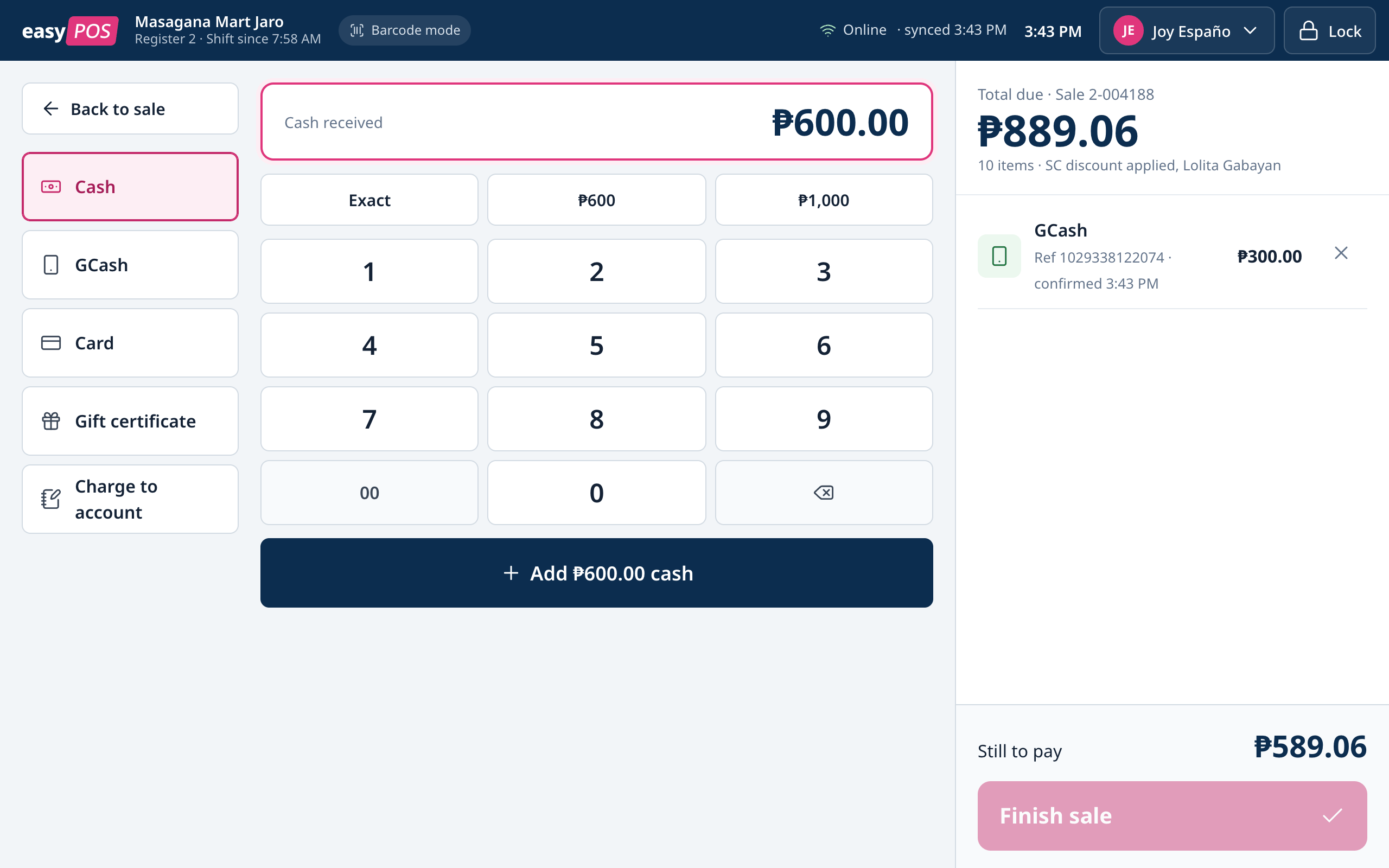
Payments stack in a list, so a customer can pay part by GCash and part in cash. Non-cash defaults to the exact balance and only cash gives change. Finish sale stays off until the sale is fully paid, and the reason is shown as Still to pay.
Tables
Every table, at a glance.
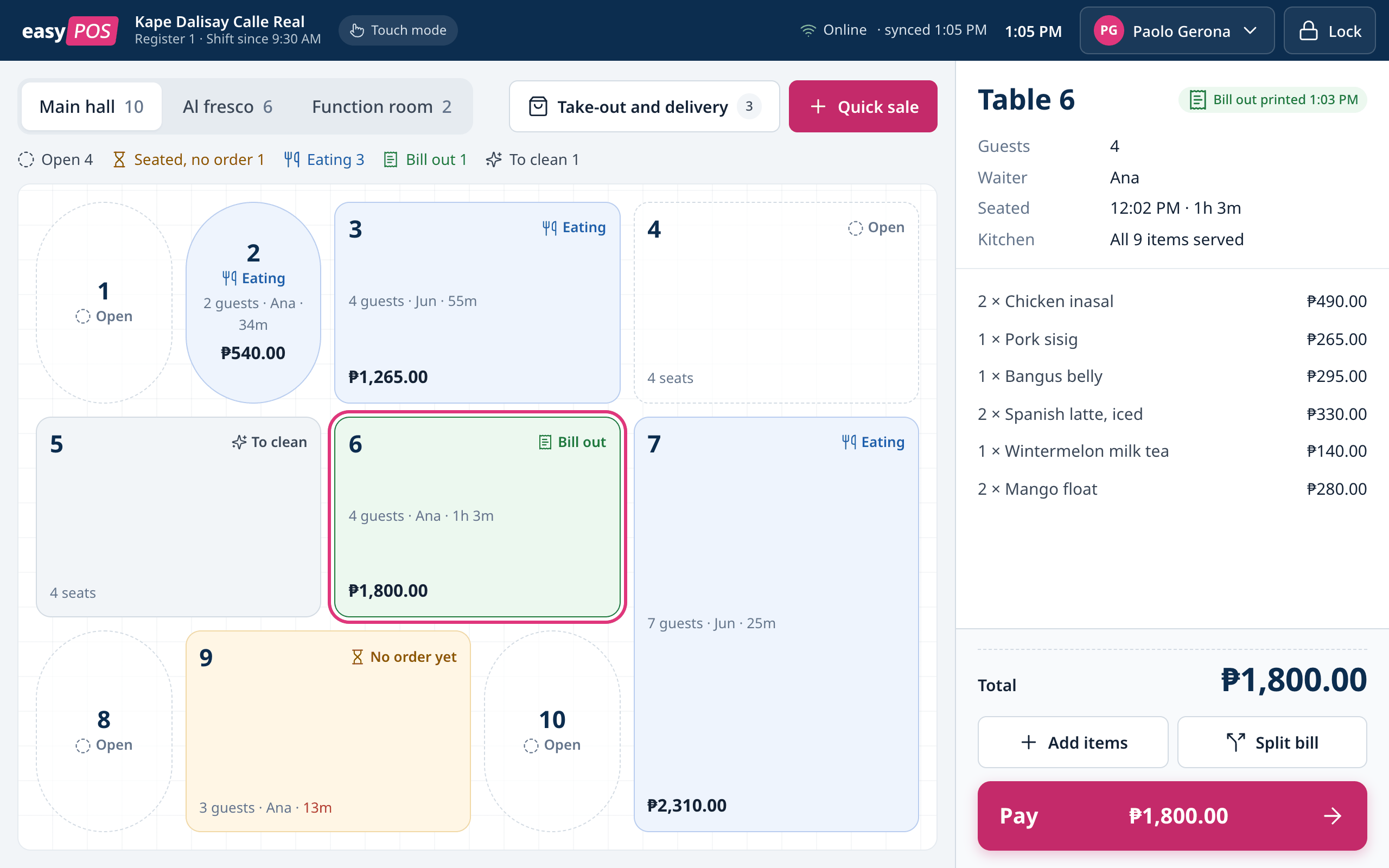
In touch mode the register opens on the floor plan. Each table shows its state with an icon and a label (open, no order yet, eating, bill out, to clean) plus the time and amount. The menu groups the order into what was already sent to the kitchen and what is new, so nothing is sent twice.
Closing a shift
Count first, then compare.
The cashier counts the drawer by bill and coin before seeing the expected amount, so the count is their own. Short or over needs a note. In the back office, the supervisor sees every shift of the day in one table, with how expected was worked out next to the cashier’s note.
Home
How today is going.
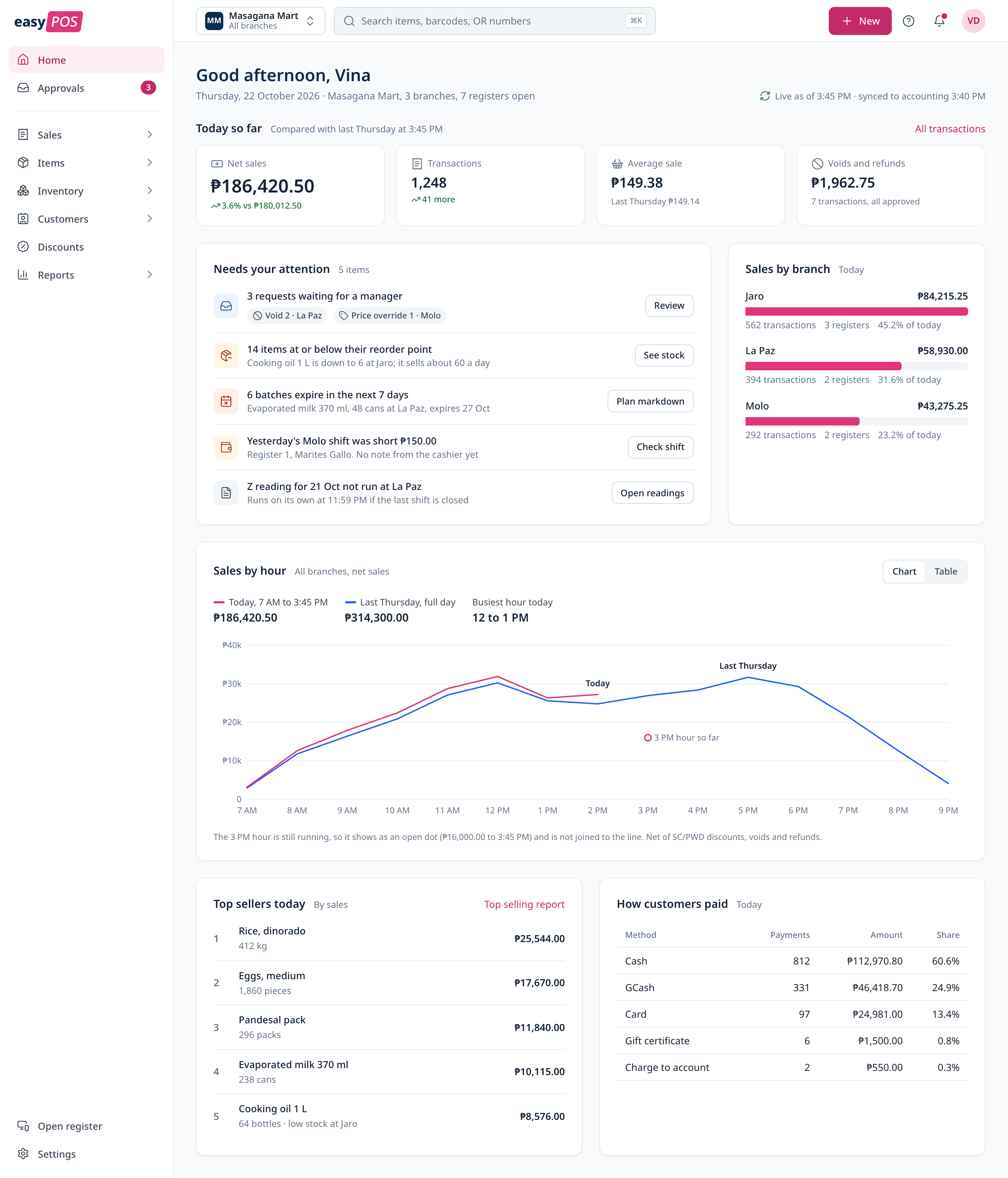
Home starts with today so far against the same time last week, then the things that need someone: approvals, low stock, expiring items, a short shift and a missing Z reading. Sales by hour and by branch, top sellers and how customers paid sit below.
Items and stock
Know what you can still make.
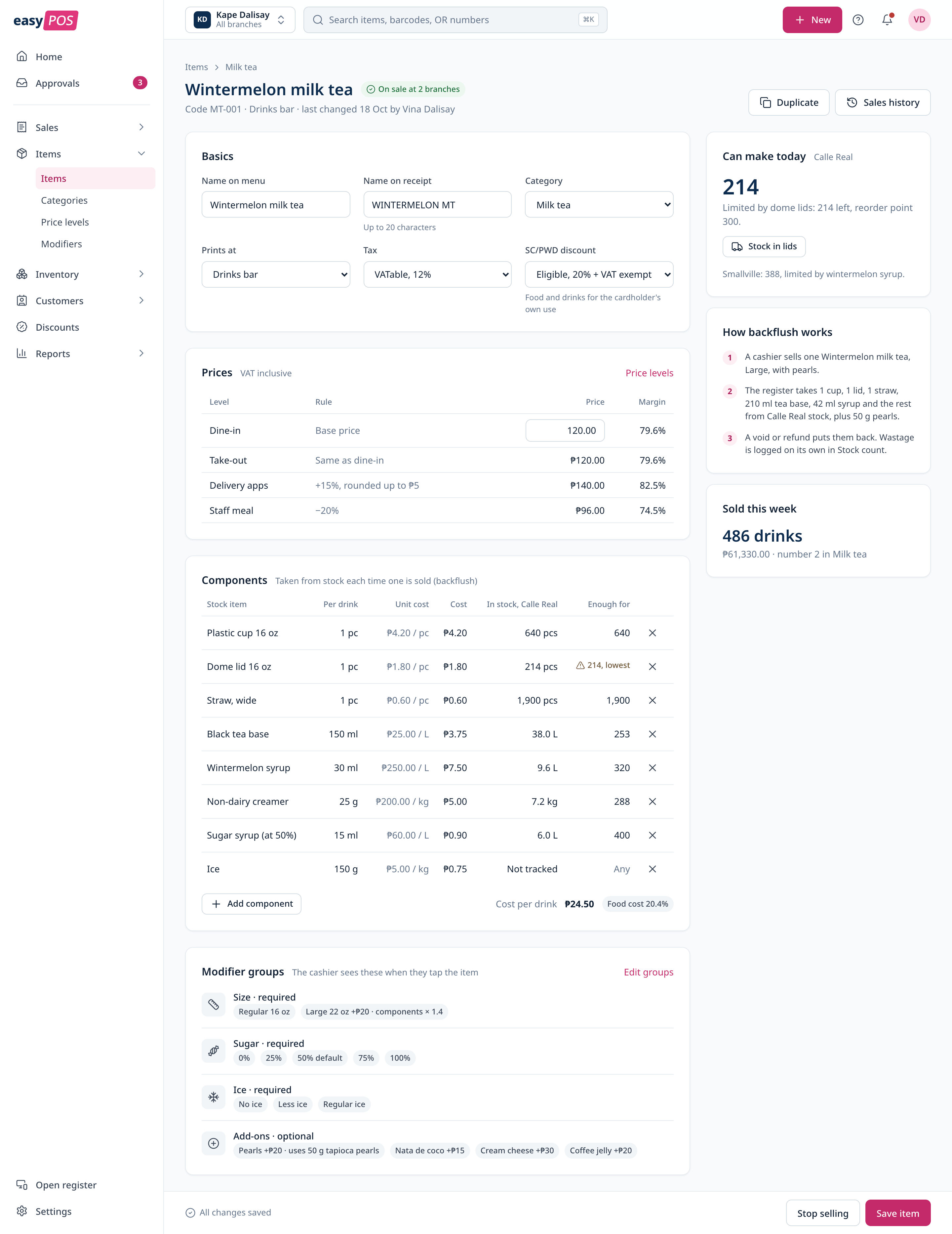
An item lists its price per order type and the stock it uses. Each sale takes those components out of stock, so the item page can say how many more can be made today and which component runs out first.
BIR readings
Every register closed, or a clear fix.
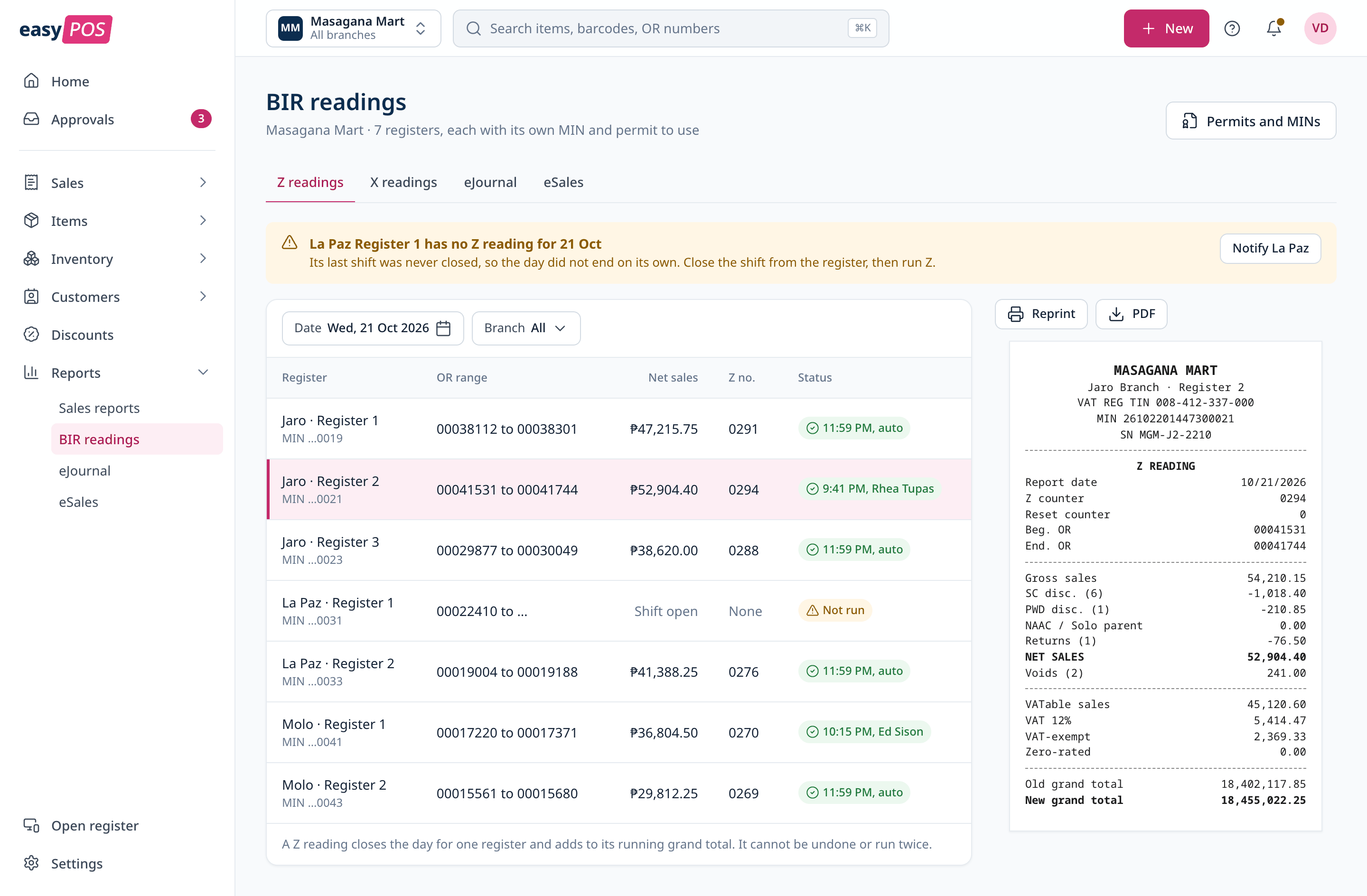
Z readings for every register sit in one table for the day. When a register did not close, a notice names it and says how to fix it, instead of the accountant finding out weeks later. X readings, the eJournal and eSales are in the same place.
Let’s talk
I’d love to tell you more on a call.
There’s more to this project than fits on one page. If you’re interested, I’m happy to walk you through it.